
Restaurant order taking directly from Android and iOS
Give your waiters a simple mobile tool to open a table, select dishes and variations, and send orders to the kitchen or other production areas through the Comanda Facile Restaurant system.

From the table to the kitchen in a few taps
Comanda Facile App is the mobile companion for Comanda Facile Restaurant. It is designed for restaurants, pizzerias, cafés, pubs, wine bars, agritourism businesses and other food-service activities that want to replace handwritten orders or dedicated handheld terminals with a more flexible smartphone and tablet workflow.
Waiters can work directly from the dining room: select the table, add dishes, enter variations or notes and send the order to the central system. The Windows server then manages the order according to the restaurant configuration and routes it to the appropriate preparation area.
It works together with Comanda Facile Restaurant, which manages the central database, tables, products, production points, printers and restaurant operations.
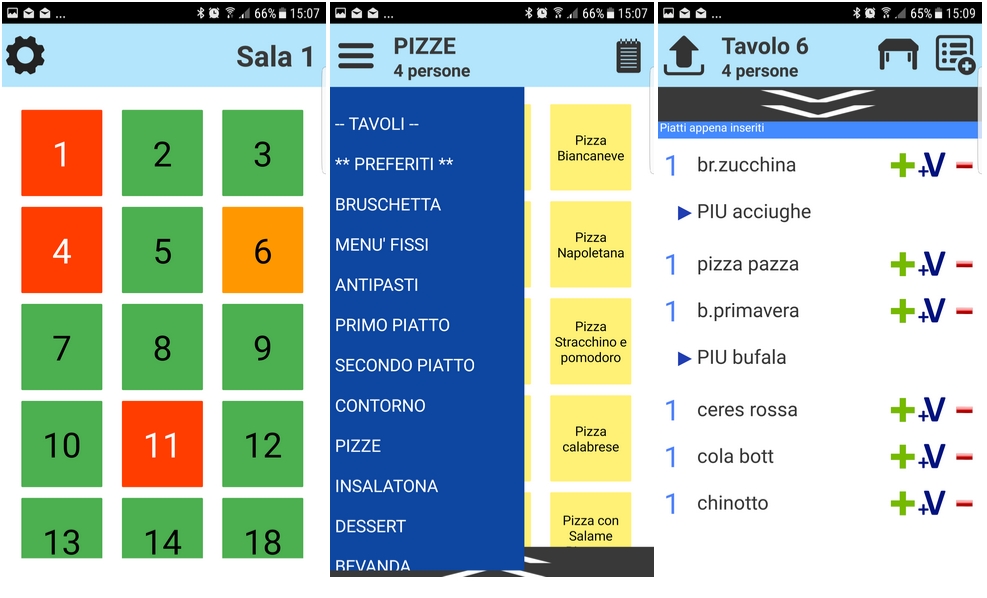
Example of the waiter interface: table selection, menu navigation and order details.
A faster and more organised table-service workflow
The objective is simple: reduce unnecessary movement between the dining room and the order station while keeping table and kitchen information connected.
Faster order taking
Orders are entered while the waiter is at the table, avoiding a second manual entry at the main workstation.
Fewer transcription errors
Dishes, quantities, notes and variations can be entered directly into the same restaurant management workflow.
Clear table status
The waiter can quickly identify tables and access the relevant order without relying on handwritten notes.
Kitchen and bar routing
Orders can be handled by the central system and sent to the configured production points, such as kitchen, bar or pizzeria.
Variations and notes
Manage additions, removals and dish variations so the preparation staff receive more precise instructions.
Designed for waiter teams
Use mobile devices as practical work tools for staff while the restaurant keeps its operations centralised.
Connect the app to Comanda Facile Restaurant
Install the server
Comanda Facile Restaurant runs on the Windows workstation that manages the restaurant database and configuration.
Configure the local connection
Enter the server IP address, communication port and password in the mobile app, using the values configured on the server.
Select table and dishes
The waiter opens the required table, chooses products and adds quantities, notes or variations.
Send the order
The order reaches the central system and can be routed to the configured preparation areas and printers.
Control app permissions from the restaurant workstation
The server-side configuration lets the restaurant define how mobile devices interact with the system. Depending on the selected configuration, operators can be given access to the functions they need during service.
- Server IP address and communication port
- Password-protected connection
- Waiter and operator configuration
- Order editing permissions
- Price and total display options
- Out-of-stock item handling
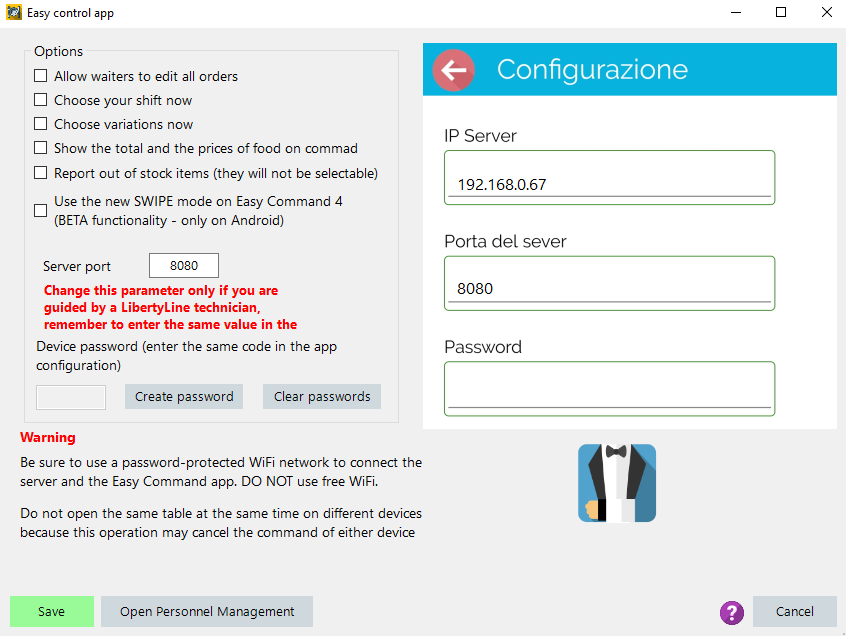
Example of server-side options and the mobile connection settings.
One mobile ordering workflow for different food-service businesses
Restaurants
Manage table orders and coordinate dining-room service with the kitchen.
Pizzerias
Send pizzas, drinks and other items to the appropriate preparation areas.
Cafés & pubs
Speed up table service and reduce unnecessary trips to the central workstation.
Wine bars
Organise table orders and keep product selections connected to the restaurant system.
Agritourism businesses
Use a familiar mobile device instead of specialised order-taking hardware.
Food-service venues
Adapt the same workflow to different rooms, service areas and staff roles.
Use a protected restaurant Wi-Fi network
For reliable communication, the Comanda Facile App should be connected to the same properly configured local network as the Windows server.
Recommended setup
- Use a password-protected Wi-Fi network.
- Avoid public or open Wi-Fi networks for server communication.
- Configure the same server IP, port and connection password on the app.
- Ask your network technician for assistance if the restaurant uses VLANs, multiple access points or advanced firewall rules.
Available for Android and iOS
Comanda Facile is available for compatible Android and Apple mobile devices. The mobile app can also be evaluated with its demo data, while the complete restaurant workflow requires the Comanda Facile Restaurant server.
Before you download
For real restaurant use, make sure you also have the correct Comanda Facile Restaurant configuration on a Windows PC and a suitable local network.
Comanda Facile App: quick answers
What is Comanda Facile App?
It is the mobile waiter application used with Comanda Facile Restaurant. It allows staff to select tables, enter dishes and variations and send orders to the central restaurant system.
Does the app work without Comanda Facile Restaurant?
The app can be explored with its demo data, but normal restaurant operation requires the Comanda Facile Restaurant server, which manages the restaurant database, tables, products and order workflow.
Can I use smartphones instead of dedicated handheld terminals?
Yes. The app is designed to turn compatible smartphones and tablets into practical waiter order-taking devices, reducing the need for dedicated proprietary handheld hardware.
How does the app communicate with the main computer?
The mobile device connects to the Comanda Facile Restaurant server through the restaurant's configured local network using the server IP address, communication port and connection password.
Can orders be sent to different preparation areas?
Yes. The central Comanda Facile Restaurant system can manage configured production points such as kitchen, bar or pizzeria, according to the restaurant setup.
Is Comanda Facile available for both Android and iOS?
Yes. Current versions are available through Google Play and Apple's App Store for compatible devices.
Build a smoother restaurant order workflow
Tell us how many waiters, rooms and preparation areas you manage. We can help you evaluate the most suitable Comanda Facile configuration for your restaurant.
Operating in Italy and looking for the Italian edition? Visit the Italian Comanda Facile website.
