What is business management software and how does it help a company?
Business management software brings recurring company operations into one organised environment. Instead of keeping products, inventory, sales, customers, suppliers, quotations, orders and documents in separate files or applications, the same information can be reused across connected workflows.
What is business management software?
Business management software is an application used to organise and support recurring company processes such as inventory, sales, customer and supplier records, quotations, orders and business documents.
Its main purpose is not simply to replace paper with a computer screen. The real advantage is that information entered in one area can be used by another. A product stored in inventory, for example, can later be used in an order, a sale or a document without recreating the item from scratch.
Do we have this product available?
What price should we use?
Which customer placed this order?
Which supplier provides the item?
Has this quotation become an order?
Good management software helps answer these questions using the same operational data.
What types of management software exist?
“Management software” is a broad term. Some products concentrate on a single department; others connect several operational areas in one environment.
Inventory software
Focuses on products, quantities, stock movements, availability and warehouse organisation.
Sales management
Supports sales operations, pricing, quotations, orders and customer-facing workflows.
Customer management
Organises customer and supplier information and connects those records to business activities.
Document management
Creates and organises business documents connected to products, customers and commercial operations.
Production software
Supports manufacturing or assembly processes where production is part of the business workflow.
Accounting software
Focuses on formal accounting and financial records. Its scope is different from operational business management.
A business process rarely ends inside one department
Product
Create the item once with its code, description, price and other information.
Inventory
Use the same item to track quantities and availability.
Quotation or order
Reuse product and customer data in the commercial workflow.
Sale or document
Complete the operation without rebuilding the same information.
Updated data
The resulting activity becomes part of the operational history of the business.
One application for connected daily business operations
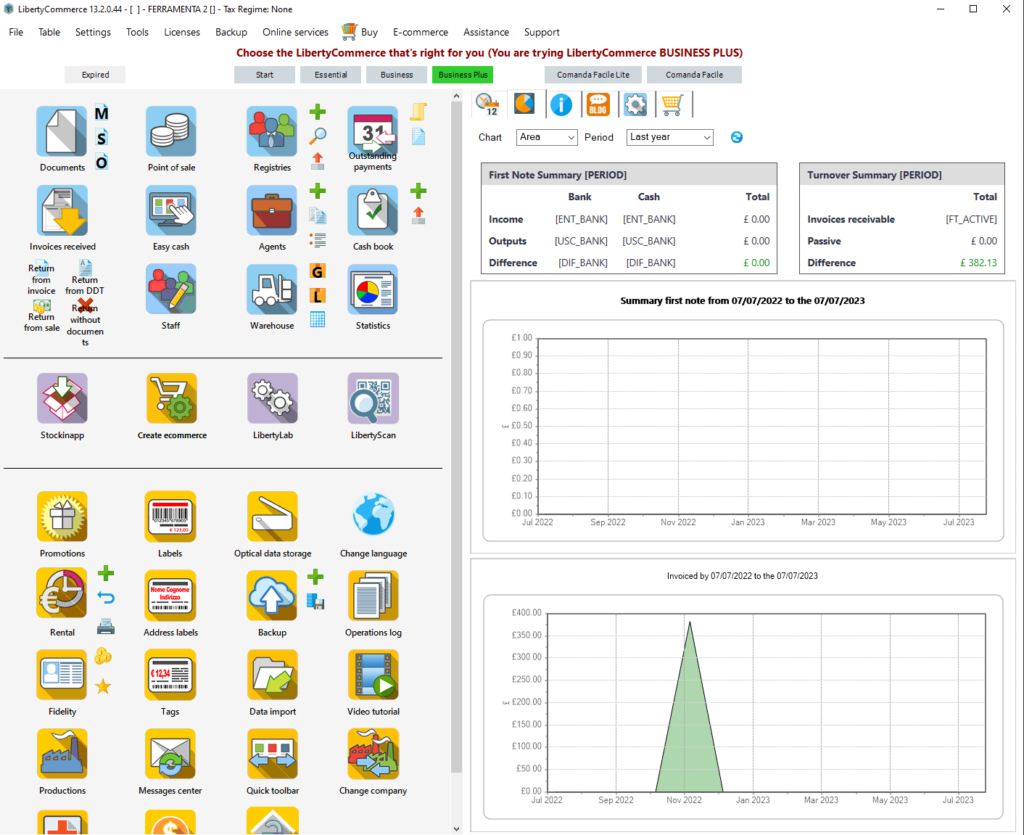
LibertyCommerce follows the integrated approach described above. The International website presents it as business-management software for retail stores, small businesses and wholesalers that need to keep products, stock, sales, customers, suppliers, quotations, orders and documents organised.
- inventory and stock management;
- sales management;
- customers and suppliers;
- quotations and orders;
- barcode workflows;
- point-of-sale operations;
- business documents;
- multilingual International Edition.
From inventory to the final business document
Inventory & warehouse
Organise products, quantities, categories, prices and availability and use the same product records in later workflows.
Explore Warehouse ManagementSales
Use product information during daily sales activities and keep sales operations connected to stock.
Explore LibertyCommerceCustomers & suppliers
Keep business contacts available when preparing quotations, orders and other commercial activities.
Business workflowsQuotations & orders
Organise commercial proposals and orders using information already stored in the management environment.
See main featuresBusiness documents
Create and manage documents as part of the same operational flow rather than as isolated files.
Explore Document ManagementBarcode workflows
Use barcodes to simplify product identification, warehouse operations and retail sales.
Barcode LabelsRelated concepts, but not interchangeable labels
The previous page described LibertyCommerce directly as an ERP and spent a large section on ERP/SOA terminology. A clearer approach for small and medium-sized businesses is to explain what each type of software actually does.
Specialised application
A program designed mainly around one specific activity, such as inventory, accounting or production.
Integrated business management
Several operational areas share the same data environment: products, stock, sales, customers, suppliers, orders and documents.
ERP platform
ERP is generally used for broader enterprise suites that may also include finance, accounting, manufacturing, HR and other corporate processes.
Management software is useful when several daily activities share the same data
Restaurant management needs a different operational workflow
Restaurants, pizzerias and cafés also need management software, but their daily workflow is different from a retail store: tables, waiter orders, kitchen operations, takeaway and checkout have to work together.
For that environment, the LibertyCommerce ecosystem includes Comanda Facile, the dedicated restaurant-management solution.
What should you look for in business management software?
A management environment designed for multilingual use
LibertyCommerce.com is focused on the International Edition. The site therefore presents the software around general business operations rather than country-specific tax procedures.
The International Edition is designed for multilingual use. Exact available languages and functions should be confirmed for the specific configuration and release a business plans to use.
Inventory and stock
Sales and retail operations
Customers and suppliers
Quotations and orders
Business documents
Restaurant management with Comanda Facile
Business management software: quick answers
What is business management software?
Business management software is an application used to organise recurring company operations such as inventory, sales, customers, suppliers, quotations, orders and business documents.
What is the main advantage of management software?
Its main advantage is connecting related operations so that information such as products, customers and suppliers can be reused instead of being entered separately for every task.
Is management software the same as accounting software?
No. Accounting software focuses on formal accounting and financial records. Management software can cover a broader range of operational activities. Some products combine both areas, while others specialise in one of them.
Is all management software an ERP?
No. ERP generally refers to broader enterprise suites that may integrate finance, accounting, manufacturing, HR and other corporate processes. Business management software can have a narrower operational scope.
What does LibertyCommerce manage?
LibertyCommerce International is designed around inventory, stock, sales, customers, suppliers, quotations, orders, barcodes, point-of-sale workflows and business documents.
Can LibertyCommerce help manage a warehouse?
Yes. Inventory and warehouse management are core areas of LibertyCommerce, including products, quantities, categories, prices and stock availability.
Can restaurants use LibertyCommerce?
Restaurants, pizzerias and cafés should evaluate Comanda Facile, the dedicated restaurant-management solution in the LibertyCommerce ecosystem.
Is LibertyCommerce available for international businesses?
Yes. LibertyCommerce.com presents the International Edition for businesses that need a multilingual management environment outside the specifically Italian context.
How should I choose management software?
Start from your real daily workflows, identify which information needs to be shared between activities, and test the software with realistic business examples.
Can I try LibertyCommerce before deciding?
Yes. The international website provides a dedicated demo request page so businesses can evaluate the software before choosing a configuration.
Test LibertyCommerce with the workflows your business actually uses
Tell us your business type, the number of users or workstations and the activities you want to manage. The most useful evaluation is not a generic feature checklist, but seeing how your normal inventory, sales and document workflows fit into the software.
